Showing posts with label 3D Modelling. Show all posts

Thursday, 26 March 2015

3D Model Assigment

This terms assignment is to model a character using the techniques we learned 
in the modeling of the T-rex base mesh.
I was given the character orthographic views and I was to model and texture it.


I started modeling with the feet.
I feel like added 1 too many edge loops which led me to 
have more complicated struggles with the rest of the body.


Although I had more vertices to move around I found 
allocating the shape to the design not that hard to do.


I had no problems extruding the arms to the sides and creation of the shoulders.
I had more trouble creating the hands, as I decided that 3 fingers don't look good to me 
so I decided to do 5 ,which wasn't the best of ideas.


After completing the hands I went on to extruding the head.

Instead of extruding the edges I extruded a face up and added 
edge loops to it and started moving the around to fit the shape of the head.
I feel like there must be a better way of doing this.


I then unwrapped the character a placed the unwrap in to 
to Photoshop where I extracted colours from the orthographic views.


The things I'm satisfied is that the body fits the orthographic view.
I'm not really keen on how the head looks in terms of shape.
More practice on modeling shall help me proceed xD


Friday, 6 March 2015

T-Rex Organic Modeling

I enjoyed organic modelling more than hard surface.
 I like the process of organic modelling. The base mesh is usually
the same or similar which makes you focus more on the design of the character.
The low poly mesh looks decent.
It also translates well in to high poly mesh when its smoothed.

I made one mistake on the mesh with the hand as there is a triangle that's hidden there.
Appart from that place im happy with the mesh.

Alley way! Texturing!

 
Today in session we did texturing of an Alley way. I found the task to be simple to do,
The UV were already done for us so all we had to do was  ad textures to the models.
I worked in Photoshop over the UV snapshots I exported from Maya.
I was pleased with the outcome of the texture work.
I would change the amount of grime on the barrel to increase its 
contrast between the wall behind it.

Friday, 23 January 2015

"T-rex" Modeling


MudBox - Probably my favourite software now :D

I really like the work flow in this software. I would probably need to work more with it to be more precise with the work I do on it but I found it pretty easy and convenient when making the abomination above.


Friday, 12 December 2014

Temple Model update

Finally made some progress with the temple assignment.


I find modeling to be easy but annoying ,as it has a tendency to go horribly wrong xD

On the other hand ...
 Texturing is A PAIN ... So many things go wrong ...

Well At least it starts looking alright after working in to it a bit.


Friday, 28 November 2014

3D Assigment! Temple..


Today we Were task with modelling of the temple form the photo on the left.

We were given 2 basic textures for the walls and the roof top which will help with texturing of the building.


I started with measuring the size of the building by making the pillars on the side and matching the distance between them by eye.


This is the progress I made in the 3 hours. I feel like there were more optimal ways of doing the rooftops and windows. 


Thursday, 16 October 2014

Turret :D Improving with Maya

Today we Modelled a Turret in Maya.

I found the task of modelling to be quite easy...
as it primarily requires you to build up shapes until you have the desired one...
The procedure was easy but sometimes when over used certain tools I would find that there would be too many vertices made...which results in some funny scenarios when working with the model.

Wednesday, 15 October 2014

UV mapping YAY

Another Lynda Homework :D
This time the focus was UV mapping...
I was asked to model tools 
( crow bar and a hammer) 
Well I learned a valuable lesson of saving frequently ... 
now I literally hold my hand over ctrl +v  to save.
So models done the tutorial went on to UV mapping 
which I found quite enjoyable.
I didn't find any problems with the 
UV mapping segment of the tutorial.
The above are the tools after I put the 
textures on top of them :D

Sunday, 5 October 2014

The beginning "Maya"

Maya

Lynda H/W
Maya Essential's 2
I learned few new ways of manipulating the shapes, most of the tools I already knew how to use.
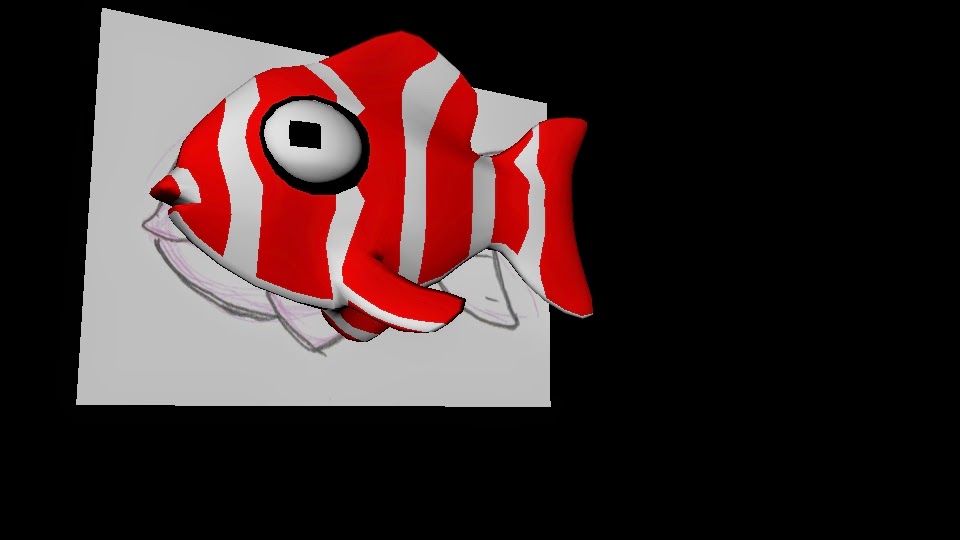
This is my Fish;
I have my fish, but its really boring....
I looked around "The INTERNET" and I 
found a way to add colour through the symmetry of the fish...
<<<<<<<<<<<<< Still doesn't look correct
Looked around on Maya and found a brush tool.
 I then researched it on the internet...
https://www.youtube.com/watch?v=vh2-3ePtU7o
That is the result:
Still doesn't look outstanding but I found that there is 
allot of possibilities with the tool, just cant quite figure 
out how it works on the object.